This is a simple pop-up menu control, that you
can show wherever you want over your forms. It's based on the MR Active Label
control.
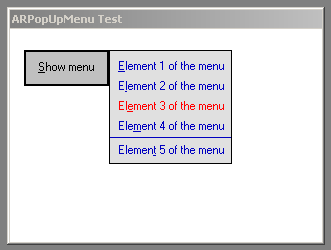
:
- 25.02.2001, version 1.01: Added
the ActiveBackColor property. Corrected other minor details about behaviour.
- 25.12.2000, version 1.00
released.
:
- ActiveBackColor: background color for
the item that is selected.
- ActiveColor: color in
which an item will be shown when the mouse is over it.
- BackColor: background
color of the menu.
- Font: font used to
show items.
- ForeColor: foreground color
of the items in the menu.
- LineWidth: width that
lines added to the menu will have, given in percentage over the width of the
menu.
- Margins: space
between the contents of the menu and the borders, given in twips.
- Spacing: space
between menu items and lines, given in twips.
- UnderlineOnMouse: set
to True if you want an item in the menu to be underlined when the mouse is
over it.
:
- AddLine: adds a
separator line to the menu.
- AddMenuItem (sText as
String, sKey as String, [sDescription as String], [sTag as String]) as
Boolean: adds an item to the menu. sText contains the text that will be
shown to the user, in which you can include an ampersand (&) to set an
accelerator key. sKey is an identifier for this item, that you will use to
know what item was selected when the MenuItemClick event fires.
sDescription
may contain a description for this element, but is not in use yet. To
sTag
you can add any additional information you may need. Returns
True if the
element was added to the menu, and False if there was any error.
:
- MenuItemClick (sKey
as String, sTag as String): this event will fire when the user clicks over
an item in the menu. Use sKey to know what element the user clicked on. In
sTag you can have any additional information you may need.
 |
(60 Kb) |
© Alvaro Redondo,
2001. All Rights Reserved.
http://www.sevillaonline.com/ActiveX/
 AR PopUp Menu ActiveX Control 1.01